Host Remark42 on Azure
It works, with costs.
Introduction
There are multiple ways to host Remark42, a lightweight and efficient comment system. You can check the official website↗ to further explore the installation options. Since my Azure credits were going to expire, I decided to experiment with Azure and host Remark42 there .This post documents how I set it up in the Azure Portal, what worked, and what trade-offs I noticed.
Deploy Azure Container App
- Create a resource group to hold all related resources to organize and manage budget.
- Create a new Container App. It will also create a managed environment.
- A few setup parameters are highlighted as follows:
| Field | Value |
|---|---|
| Deployment source | Container image |
| Image source | Docker Hub or other registries |
| Image type | Public |
| Registry login server | ghcr.io |
| Image and tag | umputun/remark42:latest |
| Ingress | Enabled |
The image settings are based on the official Remark42 Docker setup↗.
Ingress is enabled so Azure gives the app a public HTTP endpoint.
Mount Persistent Storage
Remark42 needs persistent storage (for comments, metadata, and internal state), so mount a volume instead of relying on container-local storage.
- Create a Storage Account. Choose Azure Files as primary service.
- Create a file share in that storage account. There is a minimum size to create one, and it is far far enough than the expected usage for Remark42.
- In the Container App Environment, add a storage mount that points to the file share (using account key authentication).
- In the Container App, attach that volume and mount it to /srv/var.
Configure Environment Variables
After the app is created, open Container App > Revisions and replicas > Environment variables, then add the required values.
Required:
- REMARK_URL: the public Container App URL, for example
https://remark42.region.azurecontainerapps.io. It can be changed to own website URL with Networking > Custom Domains. Acutally it will pop up the warningBlocked a frame with origin from accessing a frame with originin the browser console. After changing the URL, the warning is still there, but the remark42 will appear normally. - SECRET: a customed secret.
- Auth credentials: applying the secrets for authentication with the official guide↗ and add the credentials. I also use key vault to store them under Security > Secrets.
After changing variables, a new revision will be deployed.
Integrate with Astro Frontend
Once Remark42 is reachable from the browser, integrate it into your blog post template.
A typical embed uses:
- The host URL of your Remark42 instance
- The same site id used in SITE
- The current page URL and title
A minimal embed looks like this:
<div id="remark42"></div>
<script>
  var remark_config = {
    host: "https://remark42-xxxx.region.azurecontainerapps.io",
    site_id: "personal-blog",
    url: window.location.href,
    theme: "light"
  };

  (function(c) {
    for (var i = 0; i < c.length; i++) {
      var d = document,
        s = d.createElement("script");
      s.src = remark_config.host + "/web/" + c[i] + ".js";
      s.defer = true;
      (d.head || d.body).appendChild(s);
    }
  })(["embed"]);
</script>
My Astro blog theme already has a comment component, so I just map these values there and render it on each post page. You can also try add a theme switcher to toggle between light and dark themes, and call the function window.REMARK42.changeTheme(currentTheme()).
var remark_config = {
    host: "https://remark42-xxxx.region.azurecontainerapps.io",
    site_id: "personal-blog",
    url: window.location.href,
    theme: currentTheme(),
  };
Remark42 should work now with all the configurations!
Food for Thought
This post can prove that hosting Remark42 on Azure Container App works, but for a small personal blog it exceeds what are required. Azure Container Apps provides convenience and managed infrastructure, but the total cost (Container Apps + Azure Files) may be higher than expected.
If budget is the top priority, a small VPS can still be a better fit for Remark42. The key lesson for me: prioritize architecture and cost-effectiveness first, and treat platform convenience as a secondary benefit.
On AI:
- Reference to official document and forum is always a must. They are more reliable than AI. Sometimes I cannot find out the solution with AI, but searching the web will help.
- I am a little bit shamed by writing this post with AI. My writing is more personal than What AI does, but I think the present version is more acceptable by readers. I should try to write for public. On this aspect, AI wins.
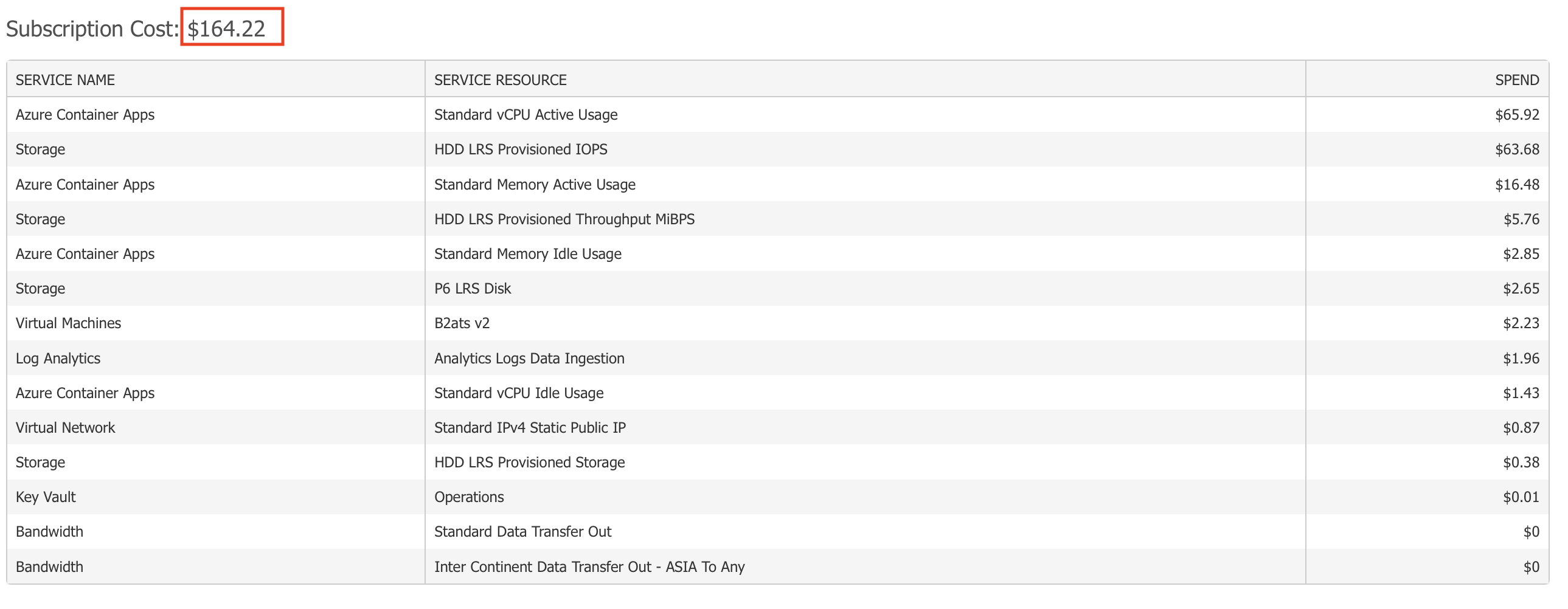
Mainly for hosting Remark42 on Azure for one month.🥲